

Industry
LegalTech & GovTech, Public & Legal Sector
Highlight
Under 60-sec access to relevant legal support
Judged: Turning Complex Information into Guided Decisions

Time
July 2025 - Sep 2025
Team
UX/UI, Data Science, Web Development
Tool

Business Context & Problem/Opportunities
For the incarcerated low-income families with misdemeanor cases in the U.S., finding reliable legal information can be slow, costly, and overwhelming. Fragmented sources, complex terminology, and limited guidance make it difficult to understand options and act quickly.
Solution
Judged replaces fragmented, manual legal research with a guided decision flow that helps the incarcerated low-income families with misdemeanor cases find relevant and affordable legal guidance in under 60 seconds.
My Role
UX/UI Designer
Led wireframing, prototyping, and UI design across key page types
Defined personas, IA, user flows, and journeys for accessible legal experiences
Built reusable UI components and design patterns
Led usability testing, participant recruitment, and iterative design
Independently developed a high-fidelity prototype and functional MVP with Lovable + Supabase API integration
Research
The Misdemeanor Justice Gap in the U.S.
U.S. local courts handle 13 million misdemeanor cases annually (80% of state dockets), rushing low-income defendants through three-minute hearings without a lawyer. While broad data shows justice-involved families hold 50% less wealth and 63% carry court debt, minor crimes drive this gap. Because free legal aid is rarely guaranteed for minor charges, a single arrest creates widespread gaps in the right to counsel and triggers unrepresented crises in housing, employment, and custody.
Insights
✅ User Needs
Clear Guidance
Plain-language, real-time tracking explaining charges, rights, and next steps.
Debt Tracking
Upfront visibility into fees and payment deadlines to prevent automated penalties driven by court debt.
Civil Legal Aid Links
A digital bridge connecting users to free civil legal aid when a case threatens housing or custody.
❌ Pain points
Extreme Speed
Forced to make life-changing plea decisions during opaque, three-minute hearings.
Hidden Costs
Friction from upfront application fees for "free" public defenders and confusion over eligibility.
Knock-on Crises
Total vulnerability to sudden job loss, eviction, or license suspension, worsening family wealth disparities.
Define & Ideate
To define problem statement, we used Job-To-Be-Done. The problem statement is the base for our following ideate phase.
Job-To-Be-Done
Low-income families in the U.S. want ease-to-understood and reliable legal information and affordable legal aid quickly, so they can support their family member arrested by misdemeanor crime.
Problem Statement
Low-income Americans struggle with finding the accessible and affordable legal information when dealing with legal units if their family member is arrested. This is a problem because:
It can affect the amount of time the person spending in jail or arrest.
It will increase the low-income families' financial and emotional burden.
It will increase distrust and inequality in the public legal system.
Turning painpoints into ideas
How Might We?
How might we make legal information more accessible for low-income Americans whose family member is arrested by misdemeanor crime?
Comparative Analysis
The competitive gap was clear: combine the accessibility of digital tools with the personalization, reliability, and guidance users need to make informed decisions.

Product Trade-offs: MoSCoW analysis
We prioritized an MVP that makes legal information easier to find, understand, and act on through simple search, clear content, affordable legal aid, and reliable process guidance.

User Journey Map
The user journey maps tell the before-and-after story of the user experience by using Judged to solve problems with product features.

Information Architecture
To enhance accessible user experience and efficient user flow, our information architecture is organized by simple content and functionality from user input, legal procedure overview to Q&A page.

User Flow
The user flow visualizes how Judged organizes and simplifies users' navigation process of legal procedure and information step by step.

The ideation centered on simplifying fragmented legal information through guided, tailored experiences that help users find support and make informed decisions faster.
Design
Design Hypothesis
We believe tailored, guided legal information can help people find relevant and affordable guidance faster and make more informed decisions than traditional search.
Design Solutions
Guided User Input System
Designed a simple questionnaire to capture user circumstances (e.g., county of arrest, adult/minor status) for tailored results
Prototype Contact Directory
Built a searchable directory of jails, courts, public defenders, and legal aid organizations for future integration.
Smart Information Retrieval
Structured a backend database to deliver organized, location-specific legal information and procedures.
Consistent Content Management
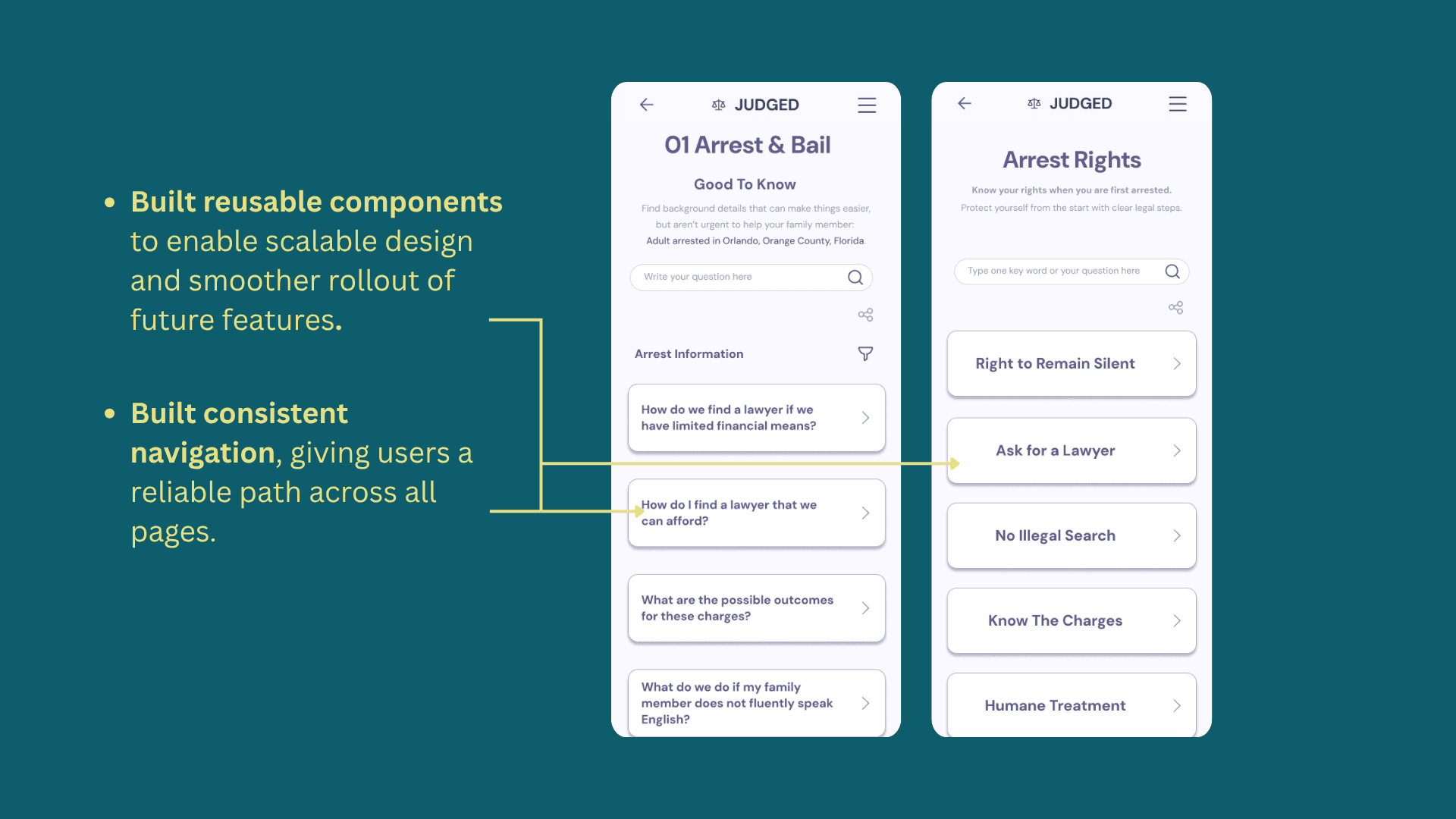
Developed a templating system to ensure clear navigation and consistency across multiple legal categories.
Mobile Usability Under Stress
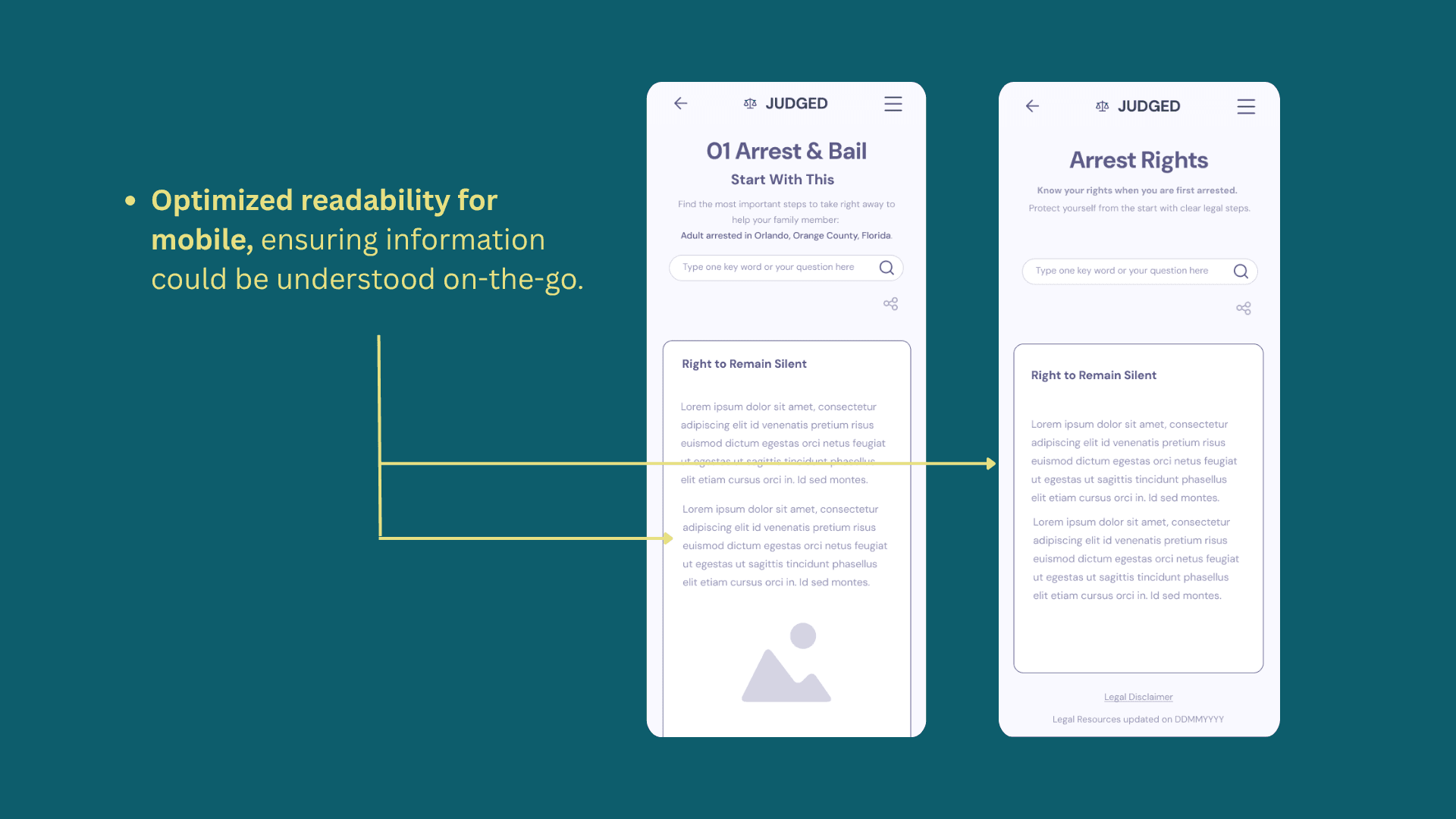
Prioritized essential information, simplified navigation, and optimized content hierarchy for crisis situations.
Lean Team Delivery
Adapted project scope after a 50% team reduction, focusing on core deliverables to deliver a functional MVP.
Wireframing & Prototyping in Figma
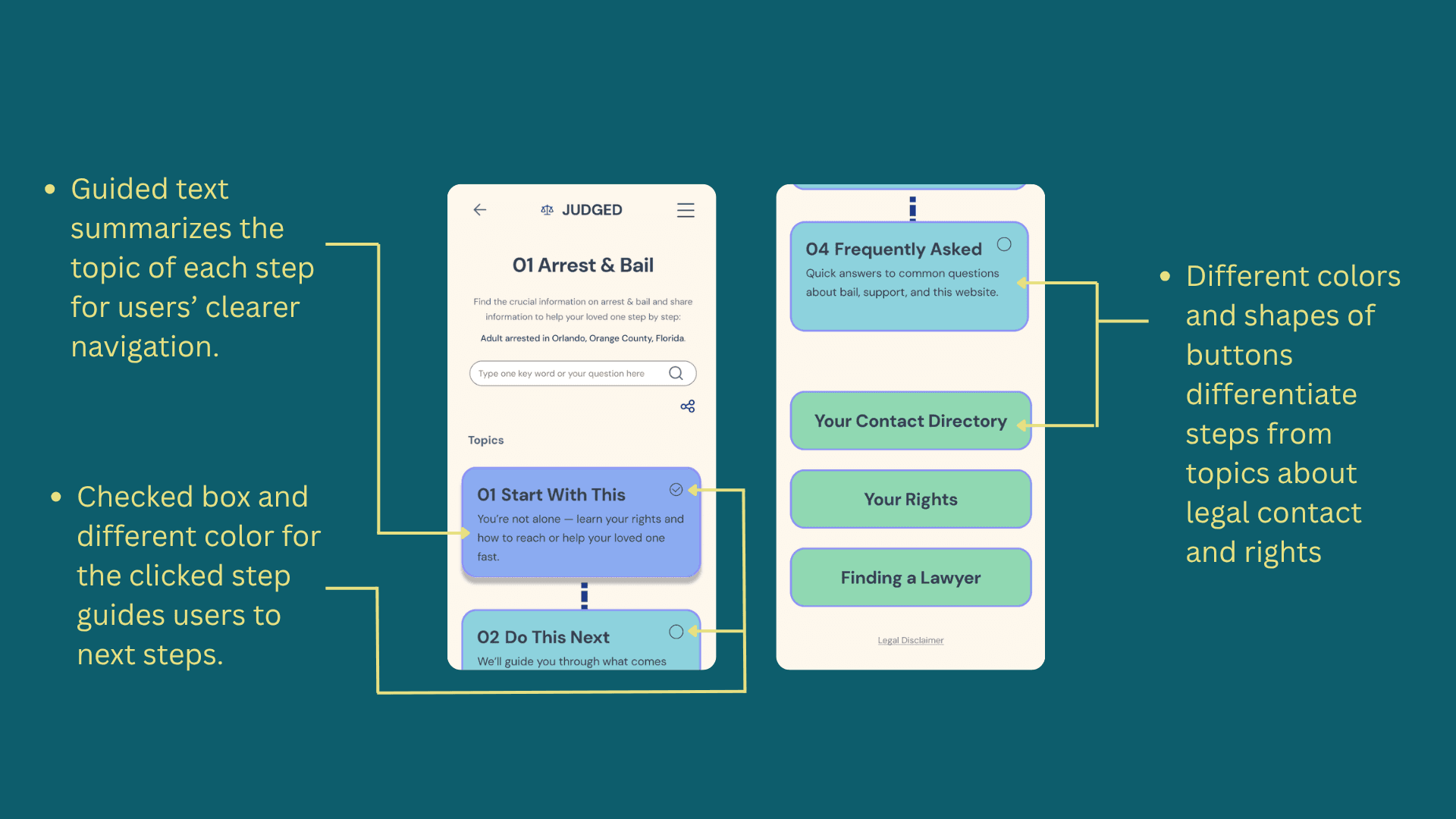
We designed wireframes that improved usability and accessibility for families navigating legal processes. Key iterations include:

Testing
Refining for improvements
The result
The unmoderated usability testing result which I conducted via Maze with participants in the U.S.A shows that users can find the legal information for the simple question less than 1 minute but around 1.5 minutes for the complex question.
Learning & Proposal
Based on the feedback from the testing report, two key parts of the prototype need to be improved to make the overall user completion time less than 1 minute.
Navigation & Flow
Clearer flow with quick-action buttons, direct links, and guided next steps.
Design & Readability
Visual hierarchy and text formatting need clearer color use, skimmable layout, and no misleading underlines.
Iteration
Vibecoding with Lovable to build MVP independantly
Even if the project ended, I still wish to see my high-fidelity prototype to come alive. Thanks to vibe coding, I learned how to use Lovable to convert my Figma high-fidelity design into MVP with login to save data feature without my front-end, back-end, and data science teams.
Click dummy (recorded by my smartphone)
Lessons Learned
Proactively communicate with UX, web development, and data science teams enabled smooth cross-functional agile work.
Prioritize usability testing over heavy reliance on the design system to build more user-centered prototype
Balance design system learning with rapid prototyping to refine designs effectively.
Be quickly adapted to team resources changes after the frontend and AI teammates left and coordinated with TechLab frontend lead to deliver the prototype on time.
Learned vibe coding and set back-end to create login function with Lovable and Supabase.
Links and Reference
Prototype on Lovable
Feature Brainstorming on Miro
User research brainstorm & analysis, personas, storyboard, user journey maps, user flow, and IA on FigJam
Wireframe and prototypes on Figma
Usability Testing plan on Figjam
Usability Testing Report on Maze
Team project presentation on Google Drive
Equal Justice Initiative. (2020, December 18). America’s massive misdemeanor system deepens inequality. eji.org
Fines and Fees Justice Center. (2015, September). Every second: The impact of incarceration on America's families. finesandfeesjusticecenter.org
National Association of Criminal Defense Lawyers. (n.d.). Misdemeanor waivers of counsel. nacdl.org
Weller, C. (2021, July 15). America’s broken criminal legal system contributes to wealth inequality. Center for American Progress. americanprogress.org